Generative AI in agriculture is often demonstrated as a simple chatbot: you ask a question, and it summarizes a PDF. But what happens when you need rigorous, mathematical predictions from a system prone to hallucination?
Inspired by the work of Agmatix and their “Leafy” assistant, we set out to build a more advanced prototype using Amazon Bedrock and a custom multi-agent framework. Our goal was to move beyond descriptive analytics (“What happened?”) to predictive simulation (“What will happen if soil pH changes?”).
This post breaks down the technical architecture of Leafy, a multi-agent swarm that autonomously performs linear regression simulations while maintaining strict data integrity.
The Challenge: LLMs Are Bad at Math
Large Language Models (LLMs) are excellent at language but terrible at calculation. If you ask GPT-4 or Claude 3 to “predict corn yield based on this CSV,” they will often hallucinate the numbers to sound plausible.
To solve this, we couldn’t rely on a single agent. We needed a Multi-Agent Architecture where specialized agents handle distinct tasks: data retrieval, statistical modeling, and user communication.
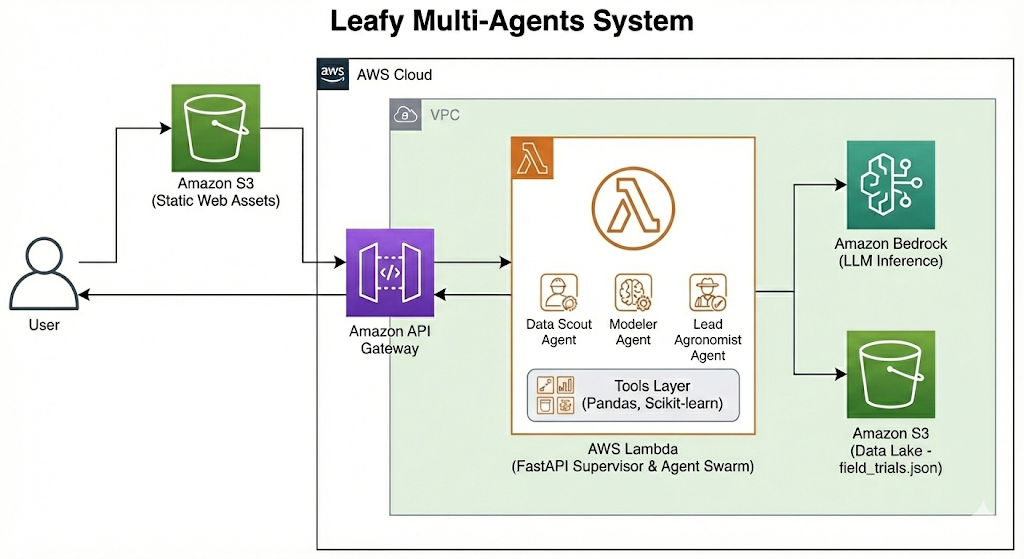
The Architecture: A Three-Agent Swarm
We utilized the Strands Agents framework (a lightweight Python SDK for Bedrock/Ollama) to orchestrate a sequential chain of three specialized agents.
1. The Data Scout (The Guardrail)
The first point of failure in RAG (Retrieval-Augmented Generation) applications is the model getting stuck in “rabbit holes”—searching for data that doesn’t exist.
The Fix: We engineered the Data Scout with a strict System Prompt that forbids it from analyzing data. Its only job is to locate the correct “file cabinet.”
YAML
# System Prompt: Data Scout
role: "Data Engineering Specialist"
system_prompt: |
  You are the Data Scout.
  GOAL: Verify we have enough data to build a model.
  INSTRUCTIONS:
  1. Extract the 'crop' from the user's query.
  2. Use 'query_trial_data' to check if records exist.
  3. STOP immediately after finding the data.
  4. DO NOT look for specific values (e.g., pH 7.5).
Why this matters: In early tests, the Scout would fail if it couldn’t find the exact target value (e.g., “pH 7.5”). By restricting its scope to just finding the dataset, we eliminated 90% of our initial errors.
2. The Modeler (The Deterministic Core)
This is where the “AI” hands off control to “Traditional ML.” We didn’t want the LLM to guess the yield; we wanted it to calculate it.
The Modeler agent is equipped with a custom Python tool, predict_growth_trends, which runs a Linear Regression using scikit-learn.
The Critical “Crop Filter” Bug: Initially, our model predicted that increasing soil pH would destroy corn yields. Debugging revealed that the agent was mixing high-yield Corn data with low-yield Soybean data. We fixed this by forcing the Modeler to use the context found by the Scout:
Python
# Tool Logic: predict_growth_trends
def predict_growth_trends(..., crop_filter):
    # CRITICAL: Filter data before regression
    data = data[data['crop'] == crop_filter]

    # Run Monte Carlo Simulation for Volatility
    std_dev = np.std(residuals)
    # ... generate Optimistic, Realistic, Pessimistic scenarios ...
3. The Lead Agronomist (The Storyteller)
The final agent synthesizes the raw JSON output into a dashboard configuration. We use Amazon Bedrock (Llama 3.2 or Nova Lite) to translate the statistical data into a narrative.
Crucially, we do not let this agent calculate the chart points. The Modeler passes a pre-calculated chart_guide object. The Lead Agronomist simply maps this data to the frontend, preventing visualization hallucinations.
Infrastructure: AWS & Serverless
To keep costs low while maintaining scalability, we containerized the swarm.
- Compute: We use AWS Lambda with Container Images. This allows the heavy ML libraries (
pandas,scikit-learn) to load in a serverless environment with 2GB of memory. - Model Hosting: We leverage Amazon Bedrock for the LLM inference. This removes the need to manage GPU servers, reducing our idle costs to near zero.
- Frontend: A lightweight FastAPI wrapper serves the agents and renders a dynamic Chart.js dashboard.
Key Takeaways for AI Engineers
- Don’t let LLMs do Math: Always offload calculations to deterministic tools (Python functions).
- Prompt Engineering is Architecture: Your system prompts define your architecture more than your Python code does. Strict constraints are necessary for reliability.
- Observability is Everything: We only solved the “Negative Slope” bug because we logged the internal “thoughts” of the intermediate agents.
Conclusion
“Leafy” demonstrates that by combining the reasoning power of GenAI with the precision of statistical modeling, we can build tools that don’t just chat—they work. This multi-agent approach is the future of decision support systems in agriculture and beyond.
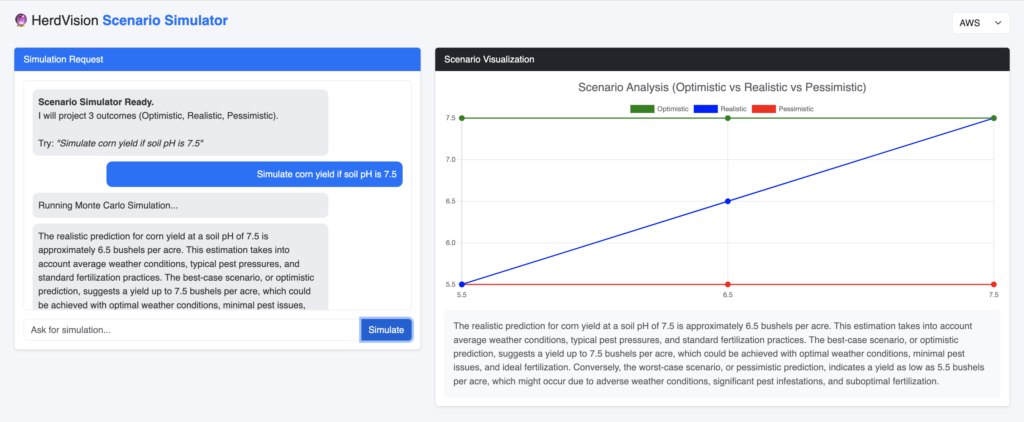
This project was built using the Strands SDK and deployed on AWS. For the full source code, check out our [GitHub/Repository Link].
Project folder structure
├── config
│   └── settings.yaml
├── data
│   └── field_trials.json
├── requirements.txt
├── src
│   ├── __init__.py
│   ├── agents
│   │   └── leafy_swarm.py
│   ├── config
│   │   └── agents
│   │       └── predictive_swarm.yaml
│   ├── core
│   │   ├── factory.py
│   │   └── utils.py
│   ├── supervisor
│   │   ├── __init__.py
│   │   └── main.py
│   └── tools
│       └── leafy_tools.py
├── static
└── templates
    └── index.html

11 directories, 12 files