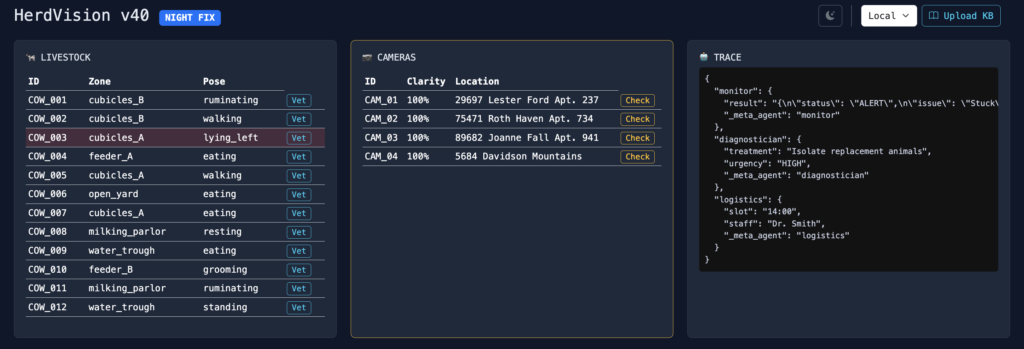
This architecture describes a specialized, configurable multi-agent system designed for automated monitoring and triage in environments like smart barns. It is built explicitly on the principles of the Strands SDK, utilizing independent, JSON-contracted pipelines for high reliability and stability.
This system separates operational concerns into independent Swarm Pipelines, ensuring robust handling for both biological and infrastructure events.
1. Core Architectural Philosophy: Strands SDK
The platform uses Strands primitives for resilience and structured processing.
- Agents as RESTful Functions: Each agent (e.g., Monitor, Scheduler) operates as a highly specialized function with a strict JSON input/output contract. This prevents cascading failures downstream.
- Dedicated Pipelines: The system avoids a single, generic router agent. Instead, the application layer triggers a dedicated, sequential
Pipeline(e.g., Health or Camera) based on the input type. - Memory Integration: Performance and accuracy are maintained through a two-tiered memory system:
- Semantic Cache: Optimizes speed by intercepting repetitive LLM calls for identical sensor readings.
- Knowledge Store (RAG): Enables specialized agents like the Diagnostician to query a ChromaDB vector store and retrieve relevant domain knowledge (e.g., medical protocols) to augment their decisions.
2. Swarm Pipelines: Agent Breakdown
The system operates two independent Swarms: the Health Swarm and the Camera Ops Swarm.
A. Veterinary Health Swarm (Sequential Pipeline)
This pipeline analyzes cow behavior data and produces a medical and logistical action plan.
| Agent | Role & Task | Technical Details |
| Monitor | Anomaly Filter. Checks raw input (e.g., pose, zone) against known issue patterns. | Input: Raw JSON telemetry. Output: {"status": "ALERT", "issue": "Stuck"}. Trained with Few-Shot Examples for stable JSON output. |
| Diagnostician | RAG-Powered Diagnosis. Formulates a treatment plan based on the issue and retrieved knowledge. | RAG: Enabled via enable_rag: true. Contextual knowledge is injected into the LLM prompt. Output: {"treatment": "Inspect hooves", "urgency": "HIGH"}. |
| Logistics | Action & Scheduling. Assigns a staff member and time slot based on the urgency output. | Input: Treatment recommendation. Output: {"slot": "14:00", "staff": "Dr. Smith"}. |
B. Camera Ops Swarm (Infrastructure Monitoring)
This pipeline handles hardware and optical integrity alerts.
| Agent | Role & Task | Technical Details |
| Camera Sentinel | Hardware Logic Gate. Evaluates telemetry against hard thresholds (e.g., Clarity $< 50$) to assign maintenance actions. | Input: Camera telemetry (lens_clarity, status). Logic: Adheres to deterministic rules defined in the system prompt. Output: {"id": "CAM_02", "health": "CRITICAL", "action": "Clean Lens"}. |
3. Operational Flow and Efficiency
The system is highly efficient and auditable:
- Dedicated API Endpoints: Tasks are triggered via dedicated, typed REST endpoints (
POST /api/swarms/healthorPOST /api/swarms/camera), removing the need for an LLM-based router and saving latency. - Auto-Pilot & Logging: A background loop drives the simulation and automatically triggers the appropriate pipeline when an anomaly is detected. All resulting diagnoses and maintenance tickets are saved to a unified
logs/anomalies.jsonlfile. - Configurability: All LLM parameters and operational settings (e.g., the 20-second simulation refresh rate) are controlled via
settings.yaml.
This complete lifecycle is illustrated in the diagram below.
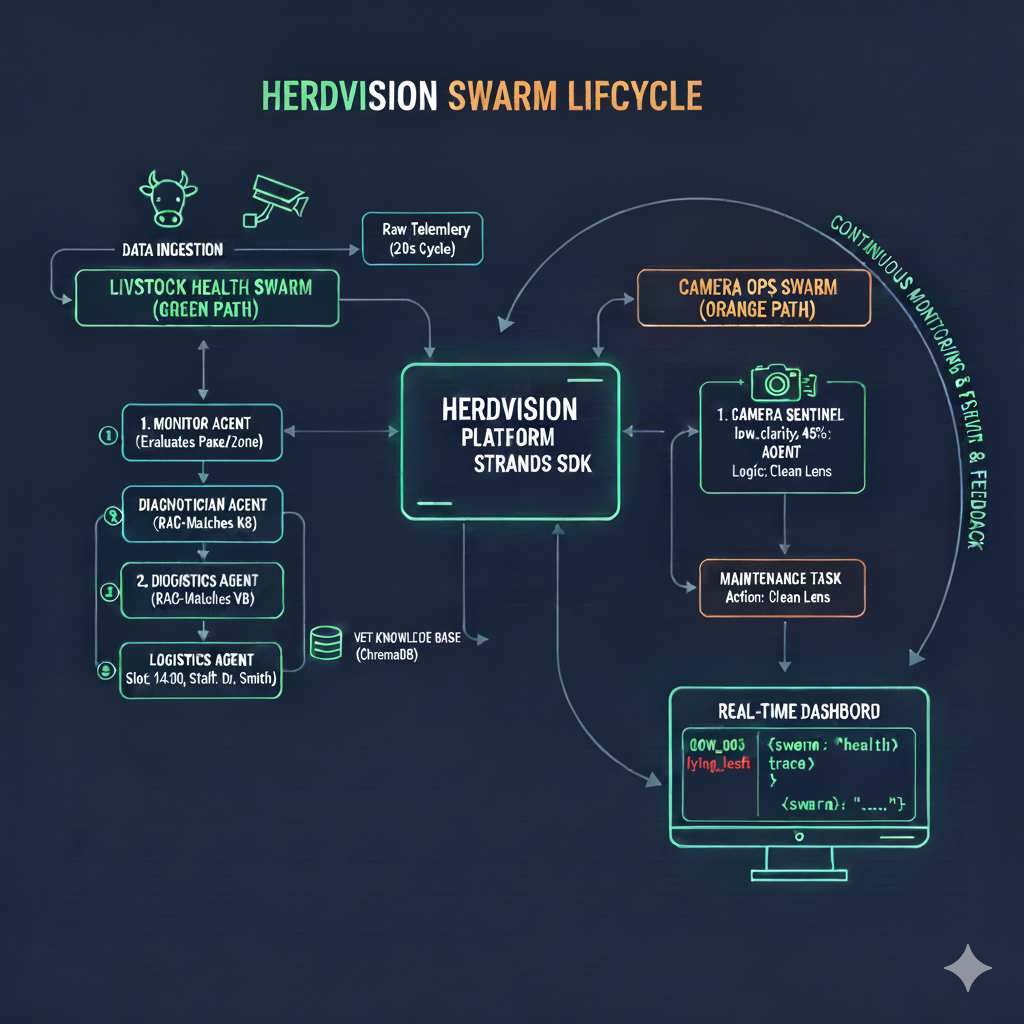
How the Swarm Pipeline Works
The term “Swarm” in this context refers to the organized, multi-step execution of agents to achieve a high-level goal (e.g., “Diagnose Cow 003”). The Strands SDK facilitates this process using the Pipeline class.
Pipeline Execution (The Swarm Process)
- Trigger: A request hits a dedicated REST endpoint (e.g.,
POST /api/swarms/health) with the initial raw data. - Pipeline Instantiation: The API instantiates the specific
Pipelineobject, which contains the sequence of agents:Pythonpipe = Pipeline([monitor, diagnostician, logistics]) - Initial Call: The
Pipelinecalls the first agent (monitor) using the raw data. - Chaining (Prev Output as Input): When the
monitorfinishes, thePipelineclass automatically captures the resulting JSON ({"status": "ALERT", "issue": "Stuck"}). It then converts this output into the new input for the next agent:PREV_OUTPUT: {"status": "ALERT", "issue": "Stuck"}. - Iteration: This process repeats sequentially until the last agent (
logistics) completes its task. - Trace Output: The result is compiled into a single Trace object (like the JSON visible on the dashboard), showing the input and final output of every agent in the chain.
This approach ensures that every step is verified, auditable, and easily debugged, preventing a single agent failure from halting the entire system without logging the failure point.