In the world of Enterprise Governance, Risk, and Compliance (GRC), “it works” isn’t enough. It has to be provable.
The first wave of Generative AI in procurement was defined by speed: summarizing contracts instantly and drafting emails in seconds. But for enterprises managing billions in spend—like global insurers, Tier 1 banks, or government bodies—speed without rigorous governance is a liability.
An AI that hallucinates a liability cap is a compliance failure. An agent reasoning on corrupt data is a strategic risk. And allowing an autonomous bot to block payments to a critical supplier without oversight is an operational disaster.
Developing a true GRC Agentic AI requires sophisticated components that go far beyond a simple chatbot. It requires a fundamental shift in architecture.
We propose a new design pattern: Neuro-Symbolic Governance, anchored by a “Data Quality Firewall.”
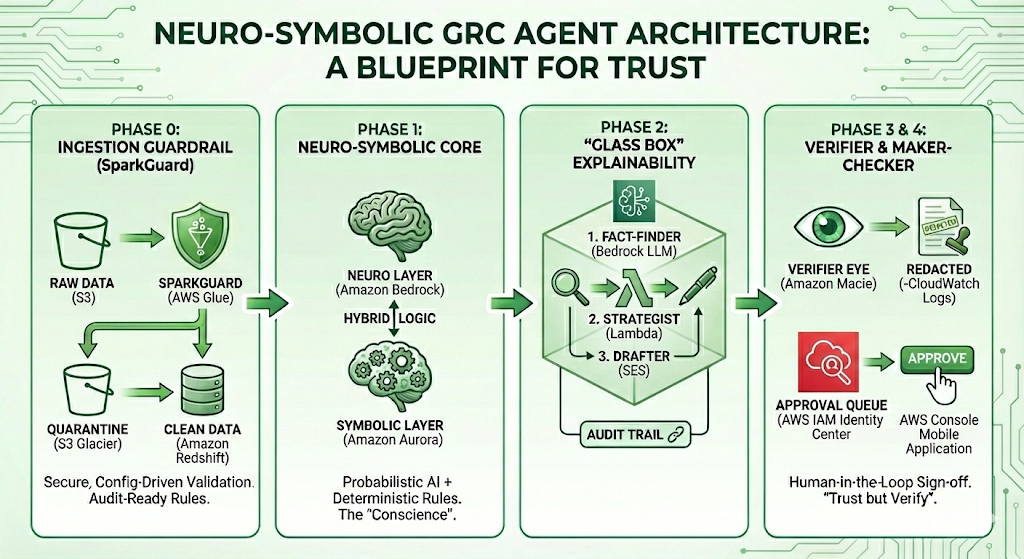
Below is a blueprint for thinking “outside the box”—a guide to solving the four biggest barriers to enterprise adoption: Bad Data, Hallucination, Black-Box Logic, and Autonomy Control.
Phase 0: The Ingestion Guardrail (SparkGuard)
The Barrier: “Garbage In, Garbage Out.” If an AI agent reads a supplier record with a malformed tax ID or an invalid postcode, its risk assessment will be flawed from the start.
The Solution: Secure, Configuration-Driven Validation. Before data ever reaches the AI, it must pass through a “Data Quality Firewall.” We utilize SparkGuard, a custom validation engine built on Apache Spark. Unlike brittle, hard-coded scripts, SparkGuard is configuration-driven:
- Audit-Ready Rules: Validation logic (e.g.,
check_uk_postcode,check_positive_number) is defined in readable JSON/YAML. Auditors can review exactly what data is allowed in. - The Quarantine Pattern: Bad data doesn’t crash the pipeline. It is tagged and shunted to a “Quarantine Table.” The AI never sees these records, preventing “hallucinations of fact” derived from data errors.
- Security: Custom SQL rules are parsed for injection attacks, ensuring the validation layer itself remains secure.
Phase 1: The Neuro-Symbolic Core
The Barrier: Pure AI is probabilistic (it guesses). Compliance is deterministic (it knows).
The Solution: Hybrid Architecture. We separate the “Brain” from the “Conscience.”
- The “Neuro” Layer (Understanding): An LLM (e.g., Claude 3.5 Sonnet via Bedrock) reads messy, unstructured data like PDF contracts and news feeds. It handles the nuance.
- The “Symbolic” Layer (Enforcement): A Structured Database (SQL) enforces rigid logic. For example, a “Tier 1 Critical” supplier has a hard-coded set of rules. No matter how convincing the prompt injection is, the SQL layer will not allow a logic breach.
Why not just Vector DBs? Vector databases deal in semantic similarity (e.g., “92% match”). In compliance, being “92% compliant” is often a failure. We use Vector DBs to find the evidence, but SQL to enforce the decision.
Phase 2: “Glass Box” Explainability
The Barrier: If an AI negotiator suggests asking for a 5% discount, a Chief Risk Officer needs to know why. “Because the model said so” does not pass an audit.
The Solution: Traceable Reasoning Chains. We abandon the “one prompt does it all” approach. Instead, the system executes a visible, 3-step workflow:
- The Fact-Finder: Strictly extracts data (e.g., “Performance dropped 5%”). It is forbidden from calculating or opining.
- The Strategist: Takes those exact facts and applies logic (e.g., “High Severity + Contract Breach = 5% Penalty”).
- The Drafter: Converts that logic into a polite email.
This separates the decision from the communication, creating a distinct audit trail for every output.
Phase 3: The “Verifier” Guardrail
The Barrier: LLMs can be creative, sometimes inventing clauses that don’t exist to satisfy a user.
The Solution: Self-Correction Loops. We implement a secondary “Auditor Agent” (running at temperature 0.0). Before any AI-generated claim is shown to a user, this Auditor compares the claim against the raw source text. If the source text doesn’t materially support the claim, the Auditor redacts the answer automatically.
This ensures that “trust but verify” is baked directly into the code.
Phase 4: The Maker-Checker Protocol
The Barrier: No Risk Director will let an autonomous agent block payments to a strategic vendor.
The Solution: Human-in-the-Loop Sign-off. The AI is restricted to a “Recommender” role. When it detects a critical breach (e.g., a credit score drop in a Tier 1 supplier), it cannot execute the penalty. Instead, it:
- Proposes a “Pending Block” state in the database.
- Notifies a Senior Manager via a dedicated “Approval Queue.”
- Waits for a human action to execute the block.
Conclusion: The Era of “Safe” Autonomy
We are moving past the novelty phase of AI. The future belongs to platforms that treat AI agents not as magic wands, but as junior analysts: powerful and fast, but requiring clear instructions (SparkGuard), supervision (Human Sign-off), and rigorous checking (Verifier Agents).
By adopting this Neuro-Symbolic blueprint, developers can stop building chatbots and start building compliant, audit-ready GRC platforms.